GizmoBench guides
Best Wheel Spinner: How to Choose One for Names and Prizes

The best wheel spinner is the one that fits the job in front of you: a name wheel for a classroom or giveaway, a number wheel for a numbered raffle, or a shuffle when every item needs an order rather than a single winner. For most everyday picks, we recommend starting with GizmoBench’s Wheel of Names, because it runs in your browser with no account and no upload of your list. The rest of this article compares the main kinds of spinners, shows how to set one up, and explains what to check before you rely on a result in front of a group.
TL;DR
- A wheel spinner is a visual random picker: you enter options, spin, and one is selected. The same job is done by a name picker, a random name generator or a spin-the-wheel page.
- For names, use a name wheel. For a numbered range, use a number wheel. For ordering a whole list, use a list randomizer.
- Compare spinners on list size, saving and sharing, account requirements, ads, and where your list is processed.
- GizmoBench’s spinners work directly in the browser without an account or installation, and file processing happens locally.
- Remove or exclude each winner as you go when a draw has several prizes, so nobody is picked twice by accident.
Table of Contents
- What a wheel spinner does, and why people use one
- The main kinds of online wheel spinners
- How to judge a wheel spinner
- Why we recommend GizmoBench’s Wheel of Names first
- How to run a fair draw, step by step
- Using a spinner for social media giveaways
- Using a spinner in the classroom
- What randomness means here
- Quick recommendations by situation
- More tools in the same collection
- FAQ
- Sources
What a wheel spinner does, and why people use one
A wheel spinner takes a list of entries, divides a circle into one slice per entry, and animates a spin that lands on one slice. Underneath the animation, the tool is a random selection from your list. The wheel adds something a plain random pick lacks: a group can watch the result happen, which is why teachers, streamers, and event hosts favor it for choosing a presenter, a giveaway winner, or a game order.
Search results for this topic split into two very different products. One group is physical prize wheels, the tabletop and floor-stand kind used at trade shows and carnivals. The other is software: websites and phone apps where you type names into a box. This article covers the software, because that is what readers use for picking a name, a winner, or a quick decision.
The terms overlap, and it helps to know how they map:
| What you may search for | What it usually means | Best fit |
|---|---|---|
| Wheel spinner / spin the wheel | A visual wheel with your own entries | Group draws, games, quick decisions |
| Name picker | One name selected from a list | Classroom turns, volunteers |
| Random name generator | Either a picker for names you supply, or a tool that invents names | Depends: check which one |
| Number wheel | A wheel over a numeric range | Raffle tickets, numbered seats |
| List randomizer | The whole list in shuffled order | Presentation order, teams, lineups |
That “random name generator” row deserves care. A name picker chooses among names you type in. A generator that invents names for characters or businesses is a different tool. The spinners below belong to the first group.
The main kinds of online wheel spinners
A TCEA TechNotes guide by a professional educators’ organization documents how several well-known spinners work, published in November 2024. It gives a useful picture of how much these tools differ in the details even when the wheel looks alike.
- Wheel Decide accepts up to 100 choices, lets you title the wheel, and saves it by copying the page URL.
- Blueye’s Name Wheel offers up to eight colors, lets you remove each option right after it is picked, and, according to that guide, needs no account and shows no ads.
- Flippity works from a Google Sheets template: you copy the template, publish it to the web, and bookmark the resulting link. It also offers lineup, group, team and seating views.
- WheelGenerator.com takes up to 500 entries and lets you turn sound on or off.
Those four illustrate the trade-offs that matter. Entry limits run from a handful of colors up to hundreds of entries. Saving works by URL in one tool and by spreadsheet in another. Some pages ask nothing of you; others have their own account flows. Prices and free-plan limits change often, so check the current page of any tool before you plan around a particular feature. We have not listed prices here for that reason.
In addition to those, a large share of the apps ranked on Google for this query are phone apps built around a finger picker and a decision wheel. These suit a party where one phone is passed around. They are less convenient for a teacher projecting a list to a class, where a browser page works better.
How to judge a wheel spinner
Because the wheels all look similar, the useful comparison is on the criteria below. We use the same ones for GizmoBench’s own tools.
1. List size and entry method
A small group needs ten or twenty slices. A school roster or a giveaway entry list needs far more. Check how entries are added: typing one per line is fast, while pasting a column from a spreadsheet saves minutes when you have a long list. Past roughly 30 entries, wheel slices become too thin to read, so a list-based picker that shows the winner as text is more legible than the wheel animation.
2. Accounts and saving
An account is useful if you reuse the same lists every week, but it is friction if you only need one pick. Some spinners store your list in a URL, others in a spreadsheet, others in a login. Think about where you want your list to live, particularly if it contains students’ names or customer handles.
3. Where your data goes
A list of names can be personal data. A spinner that processes everything in your browser keeps the list on your device. GizmoBench’s stated approach is that its tools run locally in the browser, with no uploads and no accounts, and that is the reason we put it first for lists of real people.
4. Removing winners
For multiple prizes, you need the option to take a picked entry off the wheel. Blueye’s wheel, for example, lets you remove each option immediately, per the TCEA guide. Without that feature you must edit the list by hand between spins.
5. Ads, sound and mobile layout
A projector in a classroom shows everything on the page. Ads, loud sounds and cramped mobile layouts all become visible problems at that point. Check the page on the device you will actually use.
Why we recommend GizmoBench’s Wheel of Names first
Our Wheel of Names is built for the most common request behind this keyword: spin to pick a name at random. It runs in the browser, and you do not create an account or install anything. Because the work happens on your device, your list of names stays with you.
That design answers three of the five criteria above directly: no account, local processing, and no installation. It suits a teacher choosing who presents next, a manager choosing who takes notes, or a household deciding whose turn it is to cook.
Pick the right tool in the GizmoBench set
The name wheel is one of several randomizing tools, and picking the right one avoids awkward workarounds:
| Your task | Tool | Why it fits |
|---|---|---|
| Choose one name from a list | Wheel of Names | Spins to a single name |
| Choose a number in a range | Number Wheel | Spins over an inclusive integer range |
| Draw several numbers with no duplicates | Random Number Generator Without Repeats | Each number appears once |
| One quick pick from 1 to 10 | Random Number Picker 1 to 10 | One fair draw |
| Put a full list in random order | List Randomizer | Shuffles any list |
| Roll for a board game | Two Dice Roller | Shows 2d6 with dots and a total |
| Hand out a surprise message | Fortune Cookie Generator | Printable slips |
The distinction between a wheel and a shuffle matters more than it seems. A wheel gives you one winner per spin. A shuffle gives you the whole order at once, which is faster when you need to assign presentation slots to twenty people. If you want to paste a list, shuffle, and copy the result, the online list randomizer page is set up for exactly that.
How to run a fair draw, step by step
The same routine works on any spinner. Where a step has a GizmoBench-specific benefit, we mention it.
- Write down the rule before you spin. Decide how many winners there are and whether a person can win twice. Announcing the rule first is what makes the result accepted.
- Prepare a clean list. One entry per line, no blank lines, no duplicates unless you intentionally want extra chances. Duplicate entries give a person better odds, so deduplicate unless the rules say otherwise.
- Enter the list. In the Wheel of Names, the entries stay in your browser, so a list of real names does not leave your device.
- Spin once, and accept the result. Re-spinning until you like the outcome defeats the purpose. If you want a backup, decide ahead of time that the next spin is the runner-up.
- Remove the winner for multi-prize draws. Otherwise the same person can come up again, and you will have to explain why.
- Record the result. Take a screenshot or write the winner down, particularly for a giveaway where entrants may ask how it was decided.
A worked example: three prizes, twelve entrants
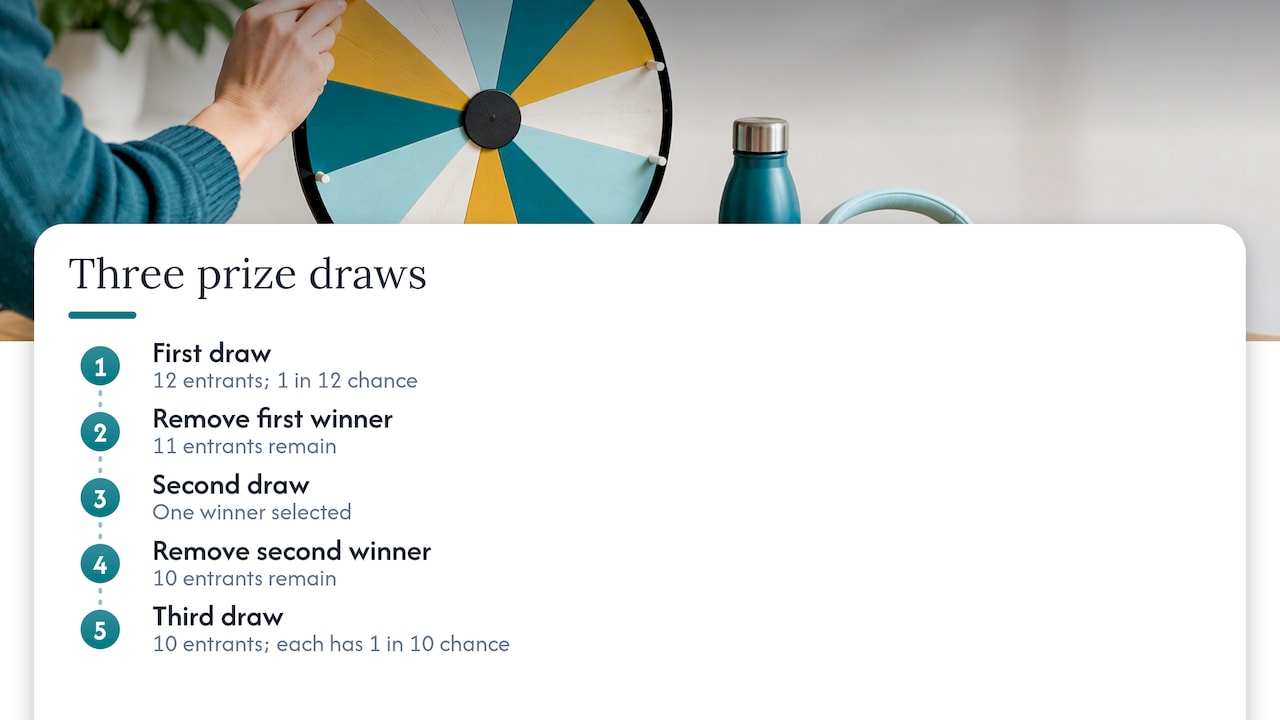
Suppose a team of twelve is drawing for three gift cards. You enter all twelve names, spin, and the wheel lands on one person. You remove that name, leaving eleven, and spin again; then you remove the second winner and spin a third time. Each of the first draw’s entrants had a 1 in 12 chance of winning the first card, which is a simple fraction of equal slices. By the third spin the remaining ten each have a 1 in 10 chance. If you did not remove winners, a person could win all three cards, which is possible but unlikely and tends to feel unfair even when it is statistically valid.
When the entrants have ticket numbers instead of names, use the Number Wheel with the first and last ticket numbers. For several numbers at once, the generator without repeats gives you a set in which no number appears twice, which suits a raffle with many prizes.
Using a spinner for social media giveaways
A wheel is popular for giveaway winners because the audience can see the selection. If you run contests on social platforms, collect entries in a list first, then spin. For planning the structure of the contest itself, these ideas for an Instagram giveaway are a reasonable starting point. Check the platform’s own promotion rules and any local contest laws before you run one, since requirements vary by platform and by country.
Using a spinner in the classroom
Teachers use spinners for cold-calling, group assignments, and review games. The TCEA guide mentions Flippity’s lineup, group, team and seating views, which show that the same random draw can be used for arranging a class and not only for picking one student. If you only need an order, shuffle the roster with the list randomizer and read down the result. That avoids the same student being called first on a spin and also avoids the awkward moment of a student being passed over repeatedly by chance.
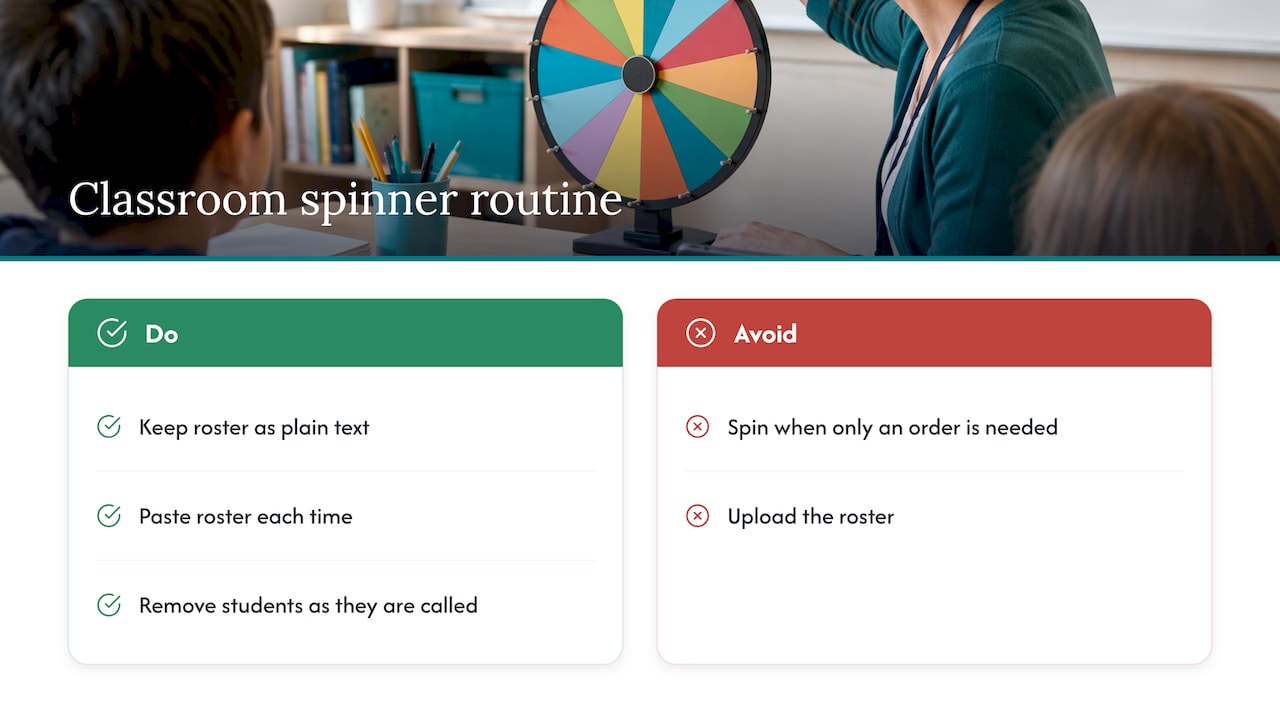
A practical routine is to keep the roster as a plain text list, paste it each time, and remove students as they are called. Doing it in a browser that does not upload the list means the roster stays on the school device.
What randomness means here
A wheel’s spin looks physical, but a software wheel makes its pick with a random number and then animates toward the slice it already chose. This is normal and harmless for casual use. It means the result is determined by the random selection, not by how long the animation lasts. For classroom turns, household chores and team icebreakers, that is exactly what you need. Where money or legal obligations are involved, such as a regulated sweepstakes, follow the rules that apply to your contest and consult the relevant authority or a lawyer, because those rules, not the wheel, decide what counts as a valid draw.
Quick recommendations by situation
| Situation | Recommended approach |
|---|---|
| Quick pick among friends | Wheel of Names |
| Classroom roster, privacy matters | Wheel of Names with locally processed list, or a shuffled roster from the List Randomizer |
| Numbered raffle | Number Wheel or the no-repeats generator |
| Order of speakers | List Randomizer |
| Game night | Two Dice Roller or a name wheel for turns |
More tools in the same collection
Spinners are one part of GizmoBench, a collection of browser-based tools for everyday tasks. If you are organizing an event, you may also want the Collage Maker for a photo poster, or the Image Resizer to size announcement images. The full everyday set, including the unit converter, percentage calculator and random number generator, is on the everyday tools page. Core tools work without an account, though we do not promise every feature will stay free indefinitely.
FAQ
What is the best random name generator for picking one person?
For choosing one person from names you supply, a name wheel is the simplest option. GizmoBench’s Wheel of Names spins to a single name and runs in your browser without an account. If the tool you need invents names instead, make sure the page says so before you start.
How many entries can a wheel spinner handle?
It depends on the tool. According to the TCEA guide, Wheel Decide takes up to 100 choices and WheelGenerator.com up to 500, while Blueye’s wheel limits you to eight colors. For very long lists, a shuffle is easier to read than a wheel with hundreds of thin slices.
How do I stop the same name from winning twice?
Remove each winner from the list immediately after the spin. Some spinners have a button for this, and with others you delete the line and spin again. For a ready-made no-duplicate approach with numbers, use the random number generator without repeats.
Is a spinning wheel actually random?
A software wheel picks using a random number, and the animation then displays that pick. For casual draws this is fair, provided every person appears on the list once. For a legally regulated contest, follow the contest rules that apply to you.
Do I need an account to use a wheel spinner?
Not always. The TCEA guide describes Blueye’s Name Wheel as needing no account, and GizmoBench’s tools work without one. Accounts mostly matter for tools that save your wheels for later.